> For the complete documentation index, see [llms.txt](https://docs.literatu.com/llms.txt). Markdown versions of documentation pages are available by appending `.md` to page URLs; this page is available as [Markdown](https://docs.literatu.com/training-materials/scribo-2.0-10-ways-to-use-scribo-in-your-school.md).
# Scribo 2.0 – 10 Ways to Use Scribo in Your School
## Introduction
Welcome to Scribo 2.0, the world's leading Artificial Intelligence (AI) platform that is helping teachers help students to write better.
Scribo implements clever combinations of AI and Machine Learning (ML) to save teachers the vast amounts of time they currently spend reviewing and grading student texts. 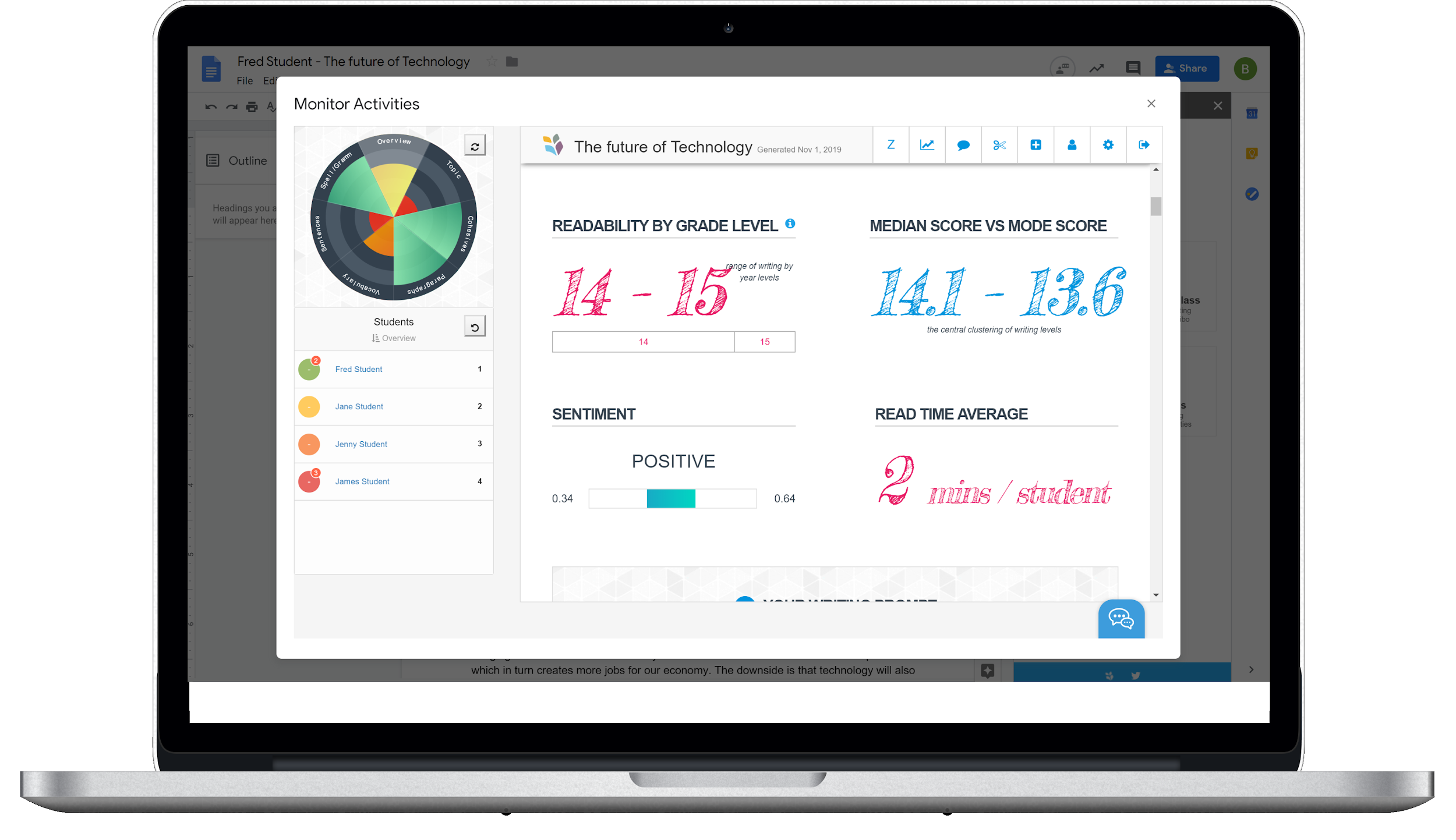 #### Our purpose is simple
We want teachers to have more time with each student, helping to improve writing skills by spending less review hours discovering where they need targeted help.
To improve writing, students need to be encouraged to write more. It's easy to figure out that encouraging students to write more means more teacher review and feedback time. More time doesn’t magically appear without adding or changing a step in the current review, drafting and grading process.
Scribo is every teacher’s feedback and grading assistant, giving them insights into where students need support and targeted instruction before they even read a word. Scribo is suitable across every year level, subject and writing context.
### Plan for Stronger Connections and Fewer Corrections
Grammar, punctuation and spelling (GPS) checkers have been with us for years. Even as they get smarter every year, they still miss opportunities to improve writing. Based on our research, GPS assistants have not and do not advance writing skills. They do correct, most times automatically as words hit the screen, over and over again.
When GPS assistants are removed, spelling, punctuation and grammar errors return to historic highs. Surely this is a contributing reason for poor results from diagnostic writing tests where GPS’s are turned off.
Text correction capabilities will never be the ‘thing’ that improves student writing skills. Correction tools don't help students transform word choices and cohesion into more varied sentence usage and paragraphs that build topic momentum, just as an example. These are foundation writing skills that need identification, instruction and practice.
Teachers agree that to improve writing, students need to practice more. More practice means more feedback and with that comes more time needed for targeted instruction. For teachers, the determiner ‘more’ relates solely to multiple units of extra time they need to find to keep up. When you multiply the number of English and humanities teachers by ‘more’, you get what is called ‘much more’. Most teachers tell us that 20 hours a week overtime is normal. Across faculties, that adds up to thousands of hours a year just to keep up.
If ‘more’ is continually invested into writing corrections, teachers will never have enough time. Teachers need better connections to where student writing skills need more help, before they even read a word.
#### Time for New Connections
It’s time for new connections to be made between students, writing improvement and teachers. Technology support for writing can open live connections into writing feedback and review for teachers and students. Imagine students being advised of keyword repetition, overuse of simple cohesion, run on sentences and more, as they are writing and before they hand work in. Imagine teachers having visibility of this with an ability to quickly target live feedback before students hand work in.
With personalised and consistent feedback delivered into a live writing workspace, students take more ownership of their writing. Without ownership, many students remain happy handing in work that then becomes their teacher’s problem to fix. The next tragedy is when students proceed to miss or lose the feedback that gets painstakingly crafted by teachers (still often in red pen). Once that feedback is handed back to students, it’s gone. Time for something different?
#### Welcome to Scribo 2.0
Scribo supports writing improvement by opening a functional connection between student writing, teacher review and the all important improvement / feedback loop. By giving students instant feedback on their writing, Scribo saves teachers hundreds of review and feedback hours. Teachers often say that the time students most need writing support is in the late hours, the night before work is due. Whenever students are writing, Scribo is beside them as their personal writing assistant and coach doing more than correcting spelling.
English and humanities teachers face challenging workloads from classes with several learning levels of student writing skills. To help each student, teachers ideally need to personalise student feedback and target teaching across the levels in the class. Scribo helps teachers identify where help is needed by reviewing every word from every student, building live insights into where help is needed. Scribo even prepares the context and examples for the review and feedback lesson.
Scribo quickly builds a stronger connection between teachers and students. Between them is the feedback loop that is the key driver of student improvement. To continually review and give effective feedback across dozens of student texts, teachers need more time and support.
*Our purpose is to replace hours of teacher invested review time with a tireless automated assistant. Scribo easily and quickly copes with large text volumes, reads every word, finds traits and examples and reports insights back to teachers consistently as a complete body of analysis.*
Scribo 2.0 is a fluent writing platform connecting teachers and students to improve core writing skills. The teacher and student connection is leveraged in several ways to suit the technology comfort level of teachers, the ability level of the students and the target the teachers are trying to reach.
Scribo is not designed to change or inflict a pedagogical approach on teachers. Many teachers use Scribo in many ways to support the pedagogical and activity planning they have in place. Many teachers rely on Scribo to create teachable moments they can cherry-pick and talk about in the context of their lesson plan. Teachers also let Scribo create lesson plans via the live panel view of the class. Scribo and in-class panel displays combine beautifully in a classroom environment. Scribo creates many views into writing that teachers have never seen before. Who can remember a pattern of fractured sentences across 40,000 words? Scribo can.
As one very experienced English teacher told us, “ You can teach many things in a day but not writing. Good writing takes time, continual practice and feedback, across many years of consistent teaching from all teachers.” Writing is the biggest challenge facing most K–12 education systems around the world. Scribo is here to help.
## How to Get Scribo Going in Your School
**1.Register your school with Literatu and request Scribo access**
To use Scribo, schools must register with Literatu. Scribo is NOT a free service, however it can be trialled FREE for 21 days for up to 50 students in a school. Follow this link and register at the bottom of the page. We will make contact and get your trial community underway. We encourage the use of a single school for multiple teacher accounts.\
#### Our purpose is simple
We want teachers to have more time with each student, helping to improve writing skills by spending less review hours discovering where they need targeted help.
To improve writing, students need to be encouraged to write more. It's easy to figure out that encouraging students to write more means more teacher review and feedback time. More time doesn’t magically appear without adding or changing a step in the current review, drafting and grading process.
Scribo is every teacher’s feedback and grading assistant, giving them insights into where students need support and targeted instruction before they even read a word. Scribo is suitable across every year level, subject and writing context.
### Plan for Stronger Connections and Fewer Corrections
Grammar, punctuation and spelling (GPS) checkers have been with us for years. Even as they get smarter every year, they still miss opportunities to improve writing. Based on our research, GPS assistants have not and do not advance writing skills. They do correct, most times automatically as words hit the screen, over and over again.
When GPS assistants are removed, spelling, punctuation and grammar errors return to historic highs. Surely this is a contributing reason for poor results from diagnostic writing tests where GPS’s are turned off.
Text correction capabilities will never be the ‘thing’ that improves student writing skills. Correction tools don't help students transform word choices and cohesion into more varied sentence usage and paragraphs that build topic momentum, just as an example. These are foundation writing skills that need identification, instruction and practice.
Teachers agree that to improve writing, students need to practice more. More practice means more feedback and with that comes more time needed for targeted instruction. For teachers, the determiner ‘more’ relates solely to multiple units of extra time they need to find to keep up. When you multiply the number of English and humanities teachers by ‘more’, you get what is called ‘much more’. Most teachers tell us that 20 hours a week overtime is normal. Across faculties, that adds up to thousands of hours a year just to keep up.
If ‘more’ is continually invested into writing corrections, teachers will never have enough time. Teachers need better connections to where student writing skills need more help, before they even read a word.
#### Time for New Connections
It’s time for new connections to be made between students, writing improvement and teachers. Technology support for writing can open live connections into writing feedback and review for teachers and students. Imagine students being advised of keyword repetition, overuse of simple cohesion, run on sentences and more, as they are writing and before they hand work in. Imagine teachers having visibility of this with an ability to quickly target live feedback before students hand work in.
With personalised and consistent feedback delivered into a live writing workspace, students take more ownership of their writing. Without ownership, many students remain happy handing in work that then becomes their teacher’s problem to fix. The next tragedy is when students proceed to miss or lose the feedback that gets painstakingly crafted by teachers (still often in red pen). Once that feedback is handed back to students, it’s gone. Time for something different?
#### Welcome to Scribo 2.0
Scribo supports writing improvement by opening a functional connection between student writing, teacher review and the all important improvement / feedback loop. By giving students instant feedback on their writing, Scribo saves teachers hundreds of review and feedback hours. Teachers often say that the time students most need writing support is in the late hours, the night before work is due. Whenever students are writing, Scribo is beside them as their personal writing assistant and coach doing more than correcting spelling.
English and humanities teachers face challenging workloads from classes with several learning levels of student writing skills. To help each student, teachers ideally need to personalise student feedback and target teaching across the levels in the class. Scribo helps teachers identify where help is needed by reviewing every word from every student, building live insights into where help is needed. Scribo even prepares the context and examples for the review and feedback lesson.
Scribo quickly builds a stronger connection between teachers and students. Between them is the feedback loop that is the key driver of student improvement. To continually review and give effective feedback across dozens of student texts, teachers need more time and support.
*Our purpose is to replace hours of teacher invested review time with a tireless automated assistant. Scribo easily and quickly copes with large text volumes, reads every word, finds traits and examples and reports insights back to teachers consistently as a complete body of analysis.*
Scribo 2.0 is a fluent writing platform connecting teachers and students to improve core writing skills. The teacher and student connection is leveraged in several ways to suit the technology comfort level of teachers, the ability level of the students and the target the teachers are trying to reach.
Scribo is not designed to change or inflict a pedagogical approach on teachers. Many teachers use Scribo in many ways to support the pedagogical and activity planning they have in place. Many teachers rely on Scribo to create teachable moments they can cherry-pick and talk about in the context of their lesson plan. Teachers also let Scribo create lesson plans via the live panel view of the class. Scribo and in-class panel displays combine beautifully in a classroom environment. Scribo creates many views into writing that teachers have never seen before. Who can remember a pattern of fractured sentences across 40,000 words? Scribo can.
As one very experienced English teacher told us, “ You can teach many things in a day but not writing. Good writing takes time, continual practice and feedback, across many years of consistent teaching from all teachers.” Writing is the biggest challenge facing most K–12 education systems around the world. Scribo is here to help.
## How to Get Scribo Going in Your School
**1.Register your school with Literatu and request Scribo access**
To use Scribo, schools must register with Literatu. Scribo is NOT a free service, however it can be trialled FREE for 21 days for up to 50 students in a school. Follow this link and register at the bottom of the page. We will make contact and get your trial community underway. We encourage the use of a single school for multiple teacher accounts.\
**2. Get teachers and students registered**
Teachers and Students register using community / class access keys or via our Literatu school onboarding process. Scribo integrates directly with Edval, O365, Google, Google Classroom and One School to establish teacher, student access, classes and accounts. If you have any of these, please let us know.\
For the purposes of a trial, we issue a Teacher registration code. Teachers create classes and give students Class key codes to self register.
**3. Students register via Single Sign On (SSO)**
Students can SSO (Single Sign On) in Scribo using their O365 or Google account. There is no point in a new account and password. With a Student Access code, registration into a class is simple and fast.
With a school community, a teacher account and some student accounts registered to a class, you are ready to start exploring Scribo and how you can use the platform to help students to write better.
## The Many Ways Teachers Leverage Scribo
Excel is a great metaphor to describe what's possible with Scribo. Just as you use Excel to quickly enter, load and add numbers, you can also use the Excel platform to model and calculate the capital position of a bank. Excel gets the work done with you at any level of your proficiency in less time and with more accuracy than a blue pen and a calculator.
Scribo also takes a platform approach to helping you improve writing. As with Excel, Scribo teachers can explore the base features and grow their experience across deeper levels of analysis as they need deeper levels of information. Every step you take with Scribo leverages new insights, new student interactions and more tailored use cases for your class and students.
Scribo is not designed to be a wall of software to climb from the outset. Scribo lets you step into options and functionality at your pace. Here are 10 ways to use Scribo in your class.
## 10 Ways to Use Scribo in Your School
1. Load student texts for instant analysis
2. Student access to writing checks for web and for Google Docs
3. Integrate class writing Activities with student writing checks
4. Instant cohort reporting
5. Cold writing with cohort analysis
6. Create Activities with live monitoring and Teacher Cohort report
7. Seamless integration with Google Classroom
8. Awesome feedback features – Rubric Marking, your way
9. Interactive writing and accessibility features
10. Plan improvement from integrated data insights
### Case 1 – Load Student texts for instant analysis
**OUTCOME**
This is the quickest and easiest way to see what Scribo analysis is all about. Gather some past texts that teachers have graded and reviewed or some new texts that are ready for review and feedback. These digital texts can be linked into Scribo for immediate analysis.
**INPUT**
Gather written digital texts from a recent essay or current writing task. Texts would ideally be of more than 150 words, and written to the same topic.
The texts can be in Word.doc format, loaded from Google Drive or in PDF format.
**PROCESS**
1. Log into Scribo with a teacher account
2. Select Scribo and your Class
3. Add an Activity

4\. Select - ‘I will upload Texts’

5\. Complete Activity profile

6\. Drag and drop digital files\

7\. Scribo will inform you when the Panel report is complete. The Panel report gives teachers a complete analysis across all students and texts analysed. This report becomes an important in-class teaching resource.

### Case 2 – Student Access to SOLO Writing Check on WEB
**OUTCOME**
Students love having direct access to Scribo writing checks. Giving students guidance as they write increases the level of ownership of their work and helps them implement feedback strategies and suggestions in a learning context, as they write. Retrospective corrections can be easily lost, overlooked or forgotten.
Scribo works alongside any digital text from Google Drive or Word. Scribo is also available inside the Google Docs framework as a Google Add-on, live inside Google Docs as students write. Scribo Student SOLO checks can be used for any text for any subject and level.
Please remember that SOLO checks do not have topic keyword links defined, and as such do not measure topic accuracy. When linked to a teacher driven activity, more detailed checks on topic and keyword usage can be completed.
\
**PROCESS**
Scribo for web is accessed as a student via [www.literatu.com](http://www.literatu.com/). The student should have a valid Literatu account or have been given a student key to register with Literatu.
1. Select Writing Check from the Scribo menu\

2. Students cut and paste text, drag/drop a Word or PDF file, or select a document from Google Drive. As Scribo does not have details of the question, Scribo will exclude keyword and topic analysis. Writing checks will reset feedback on demand.

**Checking your Topic and Keyword accuracy**
Checking text is very straightforward. What if you had a big question to answer and you really wanted to see if you were on track?
From Writing Check on the Menu, open an Advanced Writing check.

Enter your question and Scribo works out the Keywords and styles of writing for you. If you tune this manually by adding words, the writing check gets smarter and more informative. Make sure you check out Writing Styles.

###
### Case 2.1 – Student Access to SOLO Writing Checks in Google Docs
**OUTCOME**
Scribo SOLO works as an Add-on from within Google Docs. Students can check their writing as they can in Scribo SOLO for the Web.
The school Google Domain Administrator should install the Literatu Scribo app into the Google Domain, opening immediate access to all Students. Students will then have access to Scribo as an Add-on inside Google docs without the need to install Scribo for Google Docs.
Scribo can be installed from Google Marketplace via this link.\
**PROCESS**
Students create text in Google docs, open the Scribo Add-on and click Check.
A writing check can be run as a SOLO check, meaning only the student sees the results and feedback right inside Google Docs.\
.
###
### Case 2.2 – Students Check Writing Styles
**OUTCOME**
Most essay / text topics have a verb or verbs that set the style of writing required. Be it a ‘compare and contrast’, ‘discuss’, or ‘give advantages and disadvantages’ type of question, Scribo tracks and highlights the style changes or rhetorical moves students make in language to make their point, discuss advantages and disadvantages etc.
Scribo has 19 style types that students and teachers can check in one click. They are all available in Style Checking. Look for Style Checking in the Writing Check menu.
**PROCESS**
Go into Writing Check and then to **‘St**’ or Style Check. You can choose multiple sections of analysis and see where in your document you have answered the requirements of the question.
This feature is available for both teachers and students.
Extended Word Lists that match base subjects like Chemistry for example, can be loaded into Scribo and applied at any level of analysis. This opens up checking at a new level of analysis across multiple subjects that demand the use of particular topic and technical words.

**Check for Writing Styles**
The following writing styles are checked. Scribo can quickly be taught new words and combinations of phrases.
Account for, Analyse, Compare, Contrast, Criticise, Define, Describe, Discuss, Evaluate, Explain, Illustrate, Interpret, List, Outline, Prove, Recount, Relate, Review, State, Summarise, To what extent, Trace, Rhetorical Question, Inference, Background, Notation or Quote, 1st, 2nd, 3rd person, Place.
### Case 3 – Integrate Class Writing Activities with Student Writing Checks
**OUTCOME**
Scribo allows teachers to profile the writing activity and define key prompts and targets for students to follow. When teachers define the parameters of a writing activity, the analysis of Scribo gets better. Keywords and topic analysis, together with target information, school year, level and writing style definitions, all help Scribo to do a better job with automatic feedback and cohort based analysis.\
\
**PROCESS**
Teachers define the Activity / Target that students are writing to.
Create New Activity from the Scribo menu.
Activity definition sets up parameters that drive the way Scribo delivers feedback and analysis.
1. Targets – paragraph and word limits
2. Topic keywords and special synonyms if any
3. Level of writing
4. Type of writing
5. Subject / Year level
6. Special word lists
7. Writing style attributes
These are defined when an Activity is created.
Additional information such as a multimedia writing scaffold can also be created and aligned to guide student writing. Marking rubrics and student access options set up the workflow of how students will interact with the writing activity in Scribo.
An Activity is established in under one minute.

From Activity creation, workflow options can be set, such as :
1. Class assignment. Student and class assignment is simple and integrated with Google Classroom if that is being used.
2. Students can be granted access to check their work. If teachers are using Scribo for a summative Activity, the Check Work option can be disabled.
3. Students can be granted access to Scriblet, our Scribo writing assistant.
**LIVE MONITOR WRITING PROGRESS**
As students create texts in either Web or Google Classroom / Docs, Scribo allows teachers to live-monitor progress. This feature syncs student writing from Google Docs and any writing entered via Scribo for web.
### Case 4 – Instant Cohort Reporting / Overview
Teachers spend a lot of time figuring out where the class, and each student, needs targeted instruction. Teachers often talk about the lists of feedback they manually build to discuss with the class and individual students. It is critical information that takes even more time, alongside the time needed to review each student text. When there are 30+ texts to review per class, the time and effort to get this done, as rewarding as it is, adds up. Teachers are always left with the question, “Did I catch it all?” After 30,000 words, we are only human after all.
Reading EVERY word is what Scribo does, faster and more consistently than anyone. Powerful AI and machine learning finds exactly what teachers look for and goes on to build a full cohort report, ready for class discussion and discovery.
“WHERE can I engage ALL students with feedback? WHO in particular do I need to focus on? WHAT is the key point or points I want to focus on with the class?”
Scribo does this for teachers in seconds, putting them into teaching mode before they even read a word. The core inputs to the process are the thousands of words students create across a range of subjects every week. The core outcome is the amount of time Scribo saves teachers.
**OUTCOME**
The ultimate outcome for every teacher using technology is simply to get what they need with nothing more to do. Unlike many systems where teachers enter data only to have it reformatted back at them, Scribo does something very special. Scribo consumes student text and creates high value insights for teachers to review. Scribo Connect is our Artificial Intelligence learning engine that imports and analyses all genres of student texts. Before teachers even start reviewing student drafts and submissions, Scribo has read every word and rated each student.
Integrated with O365 and Google, Scribo requires no additional work from teachers to start the analysis.
**Scribo Connect**:
* builds comprehensive analyses from all student texts
* blends data and discoveries into live insights for the class and individual students
* suggests where to improve student writing across six insight categories
* allows teachers to grade, compare, summarise and deliver direct fast feedback online
* creates a range of writing analytics, built from a full analysis of student text submissions
* auto sends feedback reports to students
* tracks growth and opportunities for improvement across levels of writing
* rolls up data from student, class, subject and year levels for consolidated discussions, teaching and resource planning
Scribo quickly becomes a key assistant, helping to reduce grading time, optimise feedback and track improvement across student writing skills. Scribo Connect can be run as a standalone resource for teachers by following Feature 1 in this document.
The cohort report builds a complete analysis and insights into the writing skills and levels for the cohort and each student. The report analyses six key metrics, critical to all levels of writing, and discovers teachable moments where teachers can add the most value to a class or student.
Scribo creates over 80 points of analysis for teachers to find the teachable moment across the six core elements. The huge benefit comes from the consistency of the analysis and the depth of the insights into each core element. You can't teach good writing in a day, but you can focus on one thing at a time with great supporting examples that have your back.
When cast to a whiteboard or projector, everyone is on the same analysis page.


###
### Case 5 – Cold Writing with a Full Cohort Analysis
Take away the GPS (Grammar, Punctuation and Spelling) support and the wheels fall off writing. Many teachers agree.
The GPS analogy is like Google Maps and the other GPS acronyms. Nowadays people drive around not knowing the name of the road they are on. Take away Google and everyone is lost and no-one knows how to get from A to B.
It’s like writing without GPS support. Cold writing is a blank screen, just like a blank piece of paper handed out in Diagnostic Testing. Write something, and apply your best GPS without any support. Often this style of testing discovers the extent of the GPS core issues as well as word choices, cohesion, sentence structure and paragraphing.
\
**OUTCOME**
Scribo lets teachers run a Cold Writing activity in class, removing all GPS and surrounding assistance from the writing space. When everyone is complete, the Cohort Analysis is run to give a complete view into where to start working with students.
If teachers wanted to give a writing prompt or scaffold for the question, no problem. The level of student interaction is defined by teachers. Of course, in this scenario, students are not allowed to do a writing check.
Cold Writing with a scaffold to get students writing is one idea!

As students create their responses, teachers can Live Monitor the text. Why wait for all texts to be handed in before planning lessons ahead? Live feedback and writing checks can be run at any time.

Any time teachers want to see a cohort report, they simply ask for one. All that is needed is at least two student responses and Scribo does the rest.

### Case 6 – Create Writing Activities with Live Monitoring and Cohort Reporting
The way you can mix and match features and use cases in Scribo is very flexible. There are core features of Scribo that combine into a complete process, or stay flexible and lightweight in a just-in-time scenario.
Working in a Class Activity scenario where students engage with a writing activity (for practice or assessment), work on the text, receive teachers’ live feedback and then do a peer discussion and review by way of a Cohort analysis report, is made simple to manage by Scribo.
**OUTCOME**
Using Google Docs or Scribo Student web, students start and complete a Writing Activity. The purpose of creating a writing activity in Scribo is to engage students with a question to answer and to link their work directly to the live teacher feedback and analysis process. The process is engaging, avoiding the rush of review work for teachers to read on final submission.
**PROCESS**
**Step 1 – Create an Activity for the Class**
Follow Case 3 above and create an Activity for completion.

**Step 2 – Assign it to the Class via Scribo**
Students have access to the Activity via Google Classroom or Scribo and start working.

Students create their texts and interact with Scribo Activities in Google Docs or Scribo Web.

**Step 3 – Live Monitor – Give Feedback**
Teachers are connected with live student writing, monitoring progress and able to give feedback.

**Step 4 – Run a Cohort Report**
On demand, as part of an in progress or completion review, teachers can create a Cohort Report on demand. It’s ready in minutes to discuss with the class.

###
### Case 7 – Seamless Integration with Google Classroom and Docs
When we sit down to digitally write nowadays, it is usually in Google Docs or O365. If not, it usually ends up there so students (and adults) can share the text, print it and email it. It makes perfect sense therefore for Scribo to reside in Google Docs (soon to be O365) to help them as they write. Why move text around when you can work in one place?
\
**SCRIBO INTEGRATION INTO GOOGLE DOCS AND CLASSROOM**
So many teachers use Google Classroom and so many students use Google Docs. We integrated Scribo into the ecosystem to make it easier to access, and a logical extension to what happens in Google Docs.
Scribo is an Add-on for Google Docs, able to be installed at a School level so that each student gets access via Google Docs under the Add-ons menu. Once the student has a Scribo account linked, the Add-on is ready to go.The full features of Scribo Writing Check are alive inside Google Docs. No need to leave your document.
Teachers also have a Scribo Add-on that gives them full control over Scribo from within Google Docs. Linking Scribo to Google Classroom, creating Activities, Live.
Monitoring and instant Writing Checks are all a single click in the Scribo Google Add-on.
\
**OUTCOME**
Students and teachers use Scribo in a familiar Google context, with no need to remember web addresses and alternative sites to access. As Scribo is all about writing, it makes perfect sense to find Scribo in Google Docs.
Teachers have a live sync option to Google Classroom, able to sync their students into linked Scribo classes. If the class already uses Google Classroom, one click will sync Scribo to Classroom. This means that any Activities created in Scribo become Activities in Google Classroom. No classroom workflows change and students who are used to working in the Classroom framework will continue to do so.
With Google integration, we leave a couple of things alone rather than interrupt workflows. Grading and final marks are awarded in Google Classroom and Scribo Grammar checking does not conflict with or overtype Google grammar checking.

Teachers can quickly manage everything about a Writing Activity from the Scribo Google Add-on Panel, including reviewing a document they have created themselves, unlinked to any class.
Students enjoy using Scribo in Google Docs. All formatting is preserved, and images and footnotes are excluded from checking as well.

###
### Case 8 – Awesome Feedback Features – Rubric Marking Your Way
We love this quote from one of our favourite teachers –
*“If you’ve been in teaching for the last four or five years and you don’t know that feedback has a significant effect on learning, then you’ve had your head under a rock.” Kelly Bauer, St Lukes Assistant Principal*
Yes, teacher feedback makes the biggest impact on improving student writing skills. We all know that it also takes the most time.
We worked hard on improving feedback processes for teachers with teachers. We rethought and reworked :
1. The way teachers wanted to make effective and consistent feedback through a standardised library of comments they could activate quickly.
2. How teachers can apply a single point of feedback to a student or apply the feedback to the entire class.
3. How teachers can dictate feedback to avoid typos and use Voice to Text quickly.
4. The way feedback is saved and reported on rather than dissipated through multiple documents.
5. For ESL and language teachers, streamline the way multilingual feedback can be delivered to suit the context.

All feedback is tracked and able to be analysed by Cohort, Class, Activity and Student.

\
Rubric Making is all about you.
**OUTCOME**
Teachers can use their existing rubrics as marking guides for grading. All rubrics can be shared across teachers to minimise the number of rubric conflicts and repetition that can happen across different years and faculties.
Teachers can integrate rubric marking into Scribo to round out the whole feedback / grading process. Students can grade themselves against the rubric as they submit or turn in work for grading.
Teachers can quickly create and grade against rubrics online.

### Case 9 – Interactive Writing and Accessibility Features
*Available Term 2, 2020*
Feedback is critical when learning to write. With multiple levels of learning in a class, it is really difficult for teachers to keep up with the volume and variance of feedback required.
Once students develop a habit, it can be hard to break. GPS ( Grammar, Punctuation and Spelling) assistants help out emerging writers possibly a bit too much. There is a midpoint in Scribo between Cold Writing and GPS assisted writing and we call it *Scriblet*.
The whole process of writing improvement starts with getting students to practice more. The more practice the more feedback required from teachers. The younger the writer, the more encouragement needed. It starts to become a Catch-22 unless there is a circuit breaker. Scriblet is designed to run alongside emerging writers and help to correct basic errors of writing, as they happen – sentence by sentence, paragraph by paragraph.
\
**OUTCOME**
The intent of Scriblet is to keep students writing, with simple and effective feedback delivered to the writer and their teacher without any human intervention. Accessibility features in Scribo now voice read the feedback back to students in any native language they choose. The whole Scriblet process is open and can be used as a semi-cold writing assessment or a simple place for students to practice. Either way, teachers have a complete breakdown of where more feedback and instruction is needed.

The immersive reader handles text read-back with syllable emphasis, word cards and multilingual translations.

Making sure students understand the feedback being given is critical. This feedback can be replayed in over 20 foreign languages if required.
### Case 10 – Plan Improvement from Integrated Data Insights
Our AI and ML engines build and check a lot of data. We analyse and interpret data every second to deliver feedback, advice and suggestions. The more data Scribo collects, the more Scribo learns about writing, levels and the definition of what good writing is. All data is analysed in your context, which is so important. More on this later.
As Scribo runs its checks across text, we record a lot of headline data. This means we look at movements between writing versions, looking for improvements, changes in error rates and many more indicators that show whether writing is improving and growing, or not.

## Conclusion
Good writing is a product comprising much more than good grammar, punctuation and spelling. In fact, most times as we write (mainly type), the GPS engines fix most of the mistakes we make. Good writing is more than GPS corrections.
George Bernard Shaw famously said, “The mission of each sentence is to make the reader want to read the next one”. This is at the core of what Scribo is all about. We want every student to be the best writer they can be, to be articulate and interesting with text. Our clear intention via Scribo is to provide a functional assistant for teachers and students to advance writing skills. With insights into where help and mentoring is needed, and instant feedback coming from Scribo, students and teachers both have access to what they need.
Classroom processes to help improve writing need more support. The forever-full bag of words that teachers carry is often busy work to complete after hours. This should not be the end point of being an English or humanities teacher, but rather the beginning of being able to help each student with targeted instruction without having to read a word.
Many teachers say there are two key turning points to improving writing skills across cohorts. The first is to get students freely practising writing, taking more ownership in their work quality. The second is teachers working dramatically less hours reviewing and grading student texts and more on targeted instruction.
If the question is “ How do we improve student writing levels?”, we believe there are two good answers. Firstly, we need to do more for students than offer them simple and multi-varied GPS assistance. Feedback needs to be about the writing not just GPS. Secondly, we need to use smarter technology to increase student ownership in writing, dramatically reduce teacher review and grading hours, build instant teacher and student insights and give students good feedback as they write.
Teachers who do the same thing over and over again hoping writing improvement will simply just grow, really have their head under a rock. By adding a dash of what is possible with a little bit of clever technology support, they will be helping themselves, students and the future of the next generation of writers.
##
## Appendix : Where writing automation is really at right now. It’s not what they want to tell you!
Search Google for Babel Generator.
In Babel Generator enter three words and get an essay that scores top marks in Pearson and other automated grading systems. The essay also does well in many GPS systems. What you will get is absolute machine generated grammatically correct nonsense.

Then run this result through Scribo.
Scribo has something to say about the writing. If we had some keywords about the essay, we would definitely have more to say, like being off topic!
To work well, Artificial Intelligence (AI) needs good data. Most AI systems available have been trained around metrics that are old, narrow and heavily human biased. Babel and its machine generated nonsense climbs through this loophole rather beautifully.
Regarding that old question that keeps coming up? The answer is *Yes, we still need good teachers*. Scribo helps make teachers great!


